Mastering Facebook Timeline Covers with PSD Templates
Creating a visually cohesive and professional presence on social media is non-negotiable for anyone serious about their brand. Your Facebook Timeline Cover is prime real estate—it’s the first thing visitors see and a critical component of your overall brand identity. While custom design work can be time-consuming and expensive, a high-quality Facebook Timeline Cover PSD Template offers a powerful, efficient solution. These aren't just static images; they are layered, editable design assets built for real-world use by designers, marketers, entrepreneurs, and content creators.
Anatomy of a Professional Social Media Banner Template
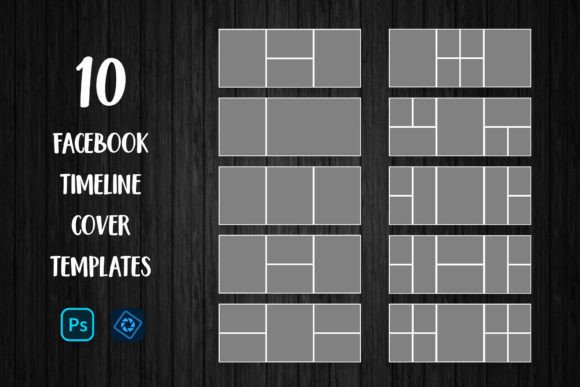
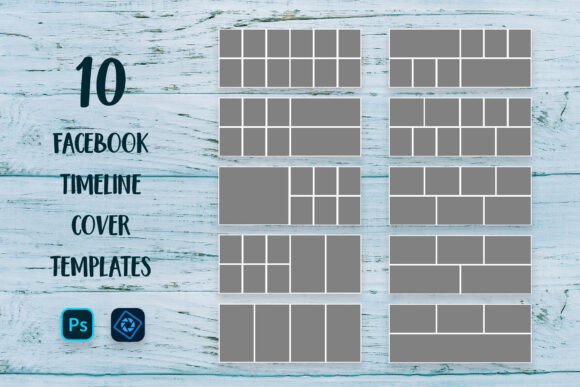
A Social Media Banner Mega Pack of 10 templates, for instance, provides variety and value. The core appeal lies in its structure. Delivered as a layered PSD file, each template is a sandbox of possibilities. You’ll typically find organized layers for background textures, placeholder image zones, text areas, and decorative elements. The standard size of 851x315px is optimized for Facebook’s display, ensuring your cover looks sharp on both desktop and mobile. The use of RGB color mode is essential for digital clarity, guaranteeing colors render correctly on screens. Furthermore, the inclusion of links to free fonts removes a common hurdle, allowing for immediate customization without additional cost or hunting for typefaces.
The true value of a layered PSD is its flexibility. Unlike a flat JPEG, you can isolate and modify every single component. Want to change the color of a graphic element? It’s on its own layer. Need to swap out a background texture? Simply toggle its visibility or replace it. This level of control is what separates amateur-looking graphics from polished, professional social media graphics. For a blogger or photographer, this means you can create a stunning collage that showcases your work without needing advanced Photoshop skills. The template does the heavy lifting on composition and layout; you simply supply the content.
Practical Applications for Brand Consistency and Engagement
Where does a Facebook Timeline Cover PSD Template truly shine? Its applications extend far beyond a personal profile refresh. For a small business owner, it’s a tool for maintaining brand consistency across campaigns. Launching a new product? Use one template style for the launch announcement cover. Running a seasonal sale? Switch to another from the pack, keeping the overall aesthetic familiar but the message fresh. This reinforces brand recognition without confusing your audience.
For marketers and agencies, these templates are a lifesaver for client work. Instead of building every social banner from scratch, you can present a client with multiple pre-designed options, streamlining the approval process. The ability to quickly mock up different visual directions using the same set of design assets saves billable hours and improves workflow efficiency. Content creators and publishers can leverage the templates to create thematic covers for article series, video playlists, or podcast episodes, using the timeline cover as a visual anchor that guides their audience’s attention.
Choosing and Implementing Your Template Effectively
Not all template packs are created equal. When evaluating a Social Media Banner PSD Template, look for clear organization. Well-named layers (e.g., “Your Image Here,” “Title Text,” “Accent Shape”) are a hallmark of a quality product. Preview the templates to assess their visual hierarchy. Does the layout naturally guide the eye from the main image to the supporting text? Is there adequate negative space to prevent a cluttered look? The style should align with your brand’s personality—whether that’s minimalist, vibrant, corporate, or whimsical.
Implementation is straightforward, as outlined in the included instructions, but a few pro tips enhance the process. When placing your images using the Clipping Mask method, don’t just drop them in. Take a moment to adjust the scale and focal point within the mask. A poorly cropped subject can ruin an otherwise great design. Similarly, while the templates may include premium font suggestions, ensure any fonts you use have clear licensing for your intended use, especially for commercial projects. The provided links typically cover this, but it’s a crucial step in professional practice.
Finally, think about the end-user experience. Your timeline cover will be viewed alongside your profile picture. Ensure the critical elements of your cover aren’t obscured by the circular profile image overlay, especially on mobile devices. Test your final exported JPG at different screen sizes if possible. The goal is a seamless, engaging visual story that makes visitors want to explore your page further, boosting audience engagement and solidifying your professional image.