Professional Invoice Template: Streamline Your Business Billing
As a business owner or creative professional, your invoice is often the last touchpoint in a client interaction. It needs to be clear, professional, and reflective of your brand. A generic, plain-text document can feel impersonal and fail to reinforce the quality of your work. This is where a thoughtfully designed Professional Invoice Template becomes an essential design asset, moving beyond a simple bill to become a polished extension of your brand identity.
More Than Just a Bill: A Complete Branding Package
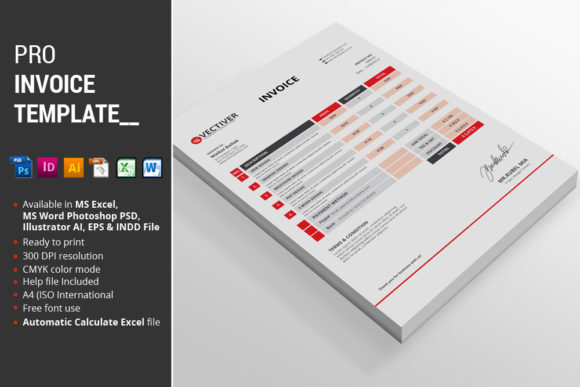
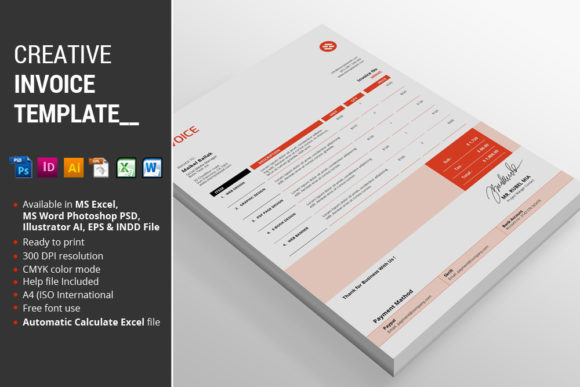
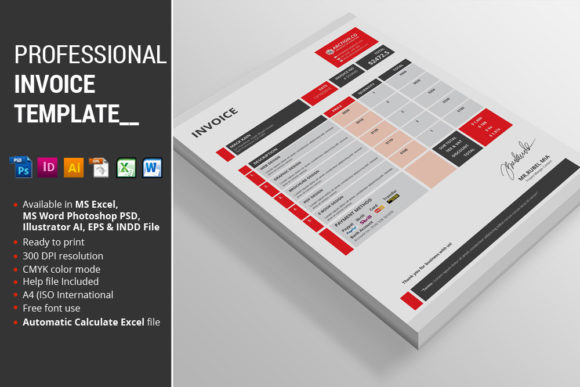
This particular template package is built with versatility and practicality at its core. It’s not a single file but a comprehensive toolkit designed for different workflows and preferences. The package includes 2 MS Excel 2010 files and 2 MS Word 2010 files, both in Red and Blue color schemes, making it immediately accessible for those who use standard office software. For designers who prefer granular control, there are 4 Photoshop PSD files, 2 InDesign CS5 files, and 2 Illustrator files, again in the Red and Blue options, plus 2 EPS files for broader compatibility. A detailed Instructions PDF is included to guide you through setup and customization, ensuring you can get started quickly regardless of your technical comfort level.
The visual design strikes a balance between modern professionalism and clean readability. It uses a structured layout with clear typographic hierarchy, ensuring your company details, client information, itemized services, and totals are presented without confusion. The available color themes—Red, Blue, Green, and Yellow—allow you to align the template with your existing brand palette, creating a seamless and recognizable client experience from proposal to payment.
Key Features for Everyday Efficiency
What truly sets this template apart are the features designed to save you time and reduce errors. The MS Excel file features automatic calculations, a critical function that handles subtotals, taxes, and grand totals dynamically. This eliminates manual math mistakes and lets you update figures with confidence. Every file is formatted to A4 (ISO International) size, the standard for business documents in most of the world, ensuring it prints correctly without adjustment.
For those using the Adobe suite, the files are built with fully organized layers and use CMYK color mode, which is essential for high-quality, color-accurate printing. This attention to technical detail means your printed invoices will look exactly as they do on screen, maintaining a professional impression. The inclusion of a fonts link in the help file ensures you can replicate the exact typographic style used in the previews, maintaining the design's integrity.
Practical Applications for Creatives and Businesses
This Professional Invoice Template finds its best use across a wide spectrum of projects. For freelancers and agencies in logo design, editorial design, or packaging design, it provides a client-facing document that mirrors the creativity and precision of your work. Small business owners in retail, consulting, or services will appreciate the clarity and professionalism it brings to their billing process, reinforcing brand perception and consistency.
It’s equally valuable for content creators, bloggers, and marketers who invoice for sponsorships, campaigns, or digital products. The template’s clean modern typography ensures readability even when itemizing numerous services, supporting a clear visual hierarchy that guides the client’s eye to the most important information: the amount due. Using a consistent, well-designed invoice can subtly enhance audience engagement and recognition, as it becomes part of the overall professional package you deliver.
Choosing and Implementing Your Template
When evaluating if this template fits your project, consider your primary workflow. If you need quick edits and automatic calculations, the Excel or Word versions are ideal. If your invoice is part of a larger suite of branded materials—like a creative font used in your social media graphics or web design—the PSD or Illustrator files offer the flexibility to integrate your exact brand fonts and colors.
Before finalizing, always test the template with your own content. Check the font pairing (the combination of typefaces used for headings and body text) to ensure it aligns with your brand’s voice. The template likely uses a combination of a sans serif font for clean data presentation and perhaps a serif font for elegant headings, but you can adjust this using the provided source files. Verify that all text remains legible when printed at standard sizes, a crucial readability consideration for any document.
Finally, while the template itself is a premium font and design resource, always confirm the licensing for the specific typefaces you use, especially if you adapt the template for client work. The included instructions will clarify the terms. By investing in a robust, well-organized template like this, you’re not just buying a billing document; you’re acquiring a tool that supports your commercial operations, enhances your professional image, and frees up mental space to focus on the creative or business work you do best.